
How refunds work on Nexar
Which orders are refunded automatically, how long it takes, and when to ask us.

Most failed orders are refunded automatically, to the wallet you paid from. Here's what happens for each product.
Virtual numbers
- If no code arrives, the order expires within about 5 minutes and is refunded automatically.
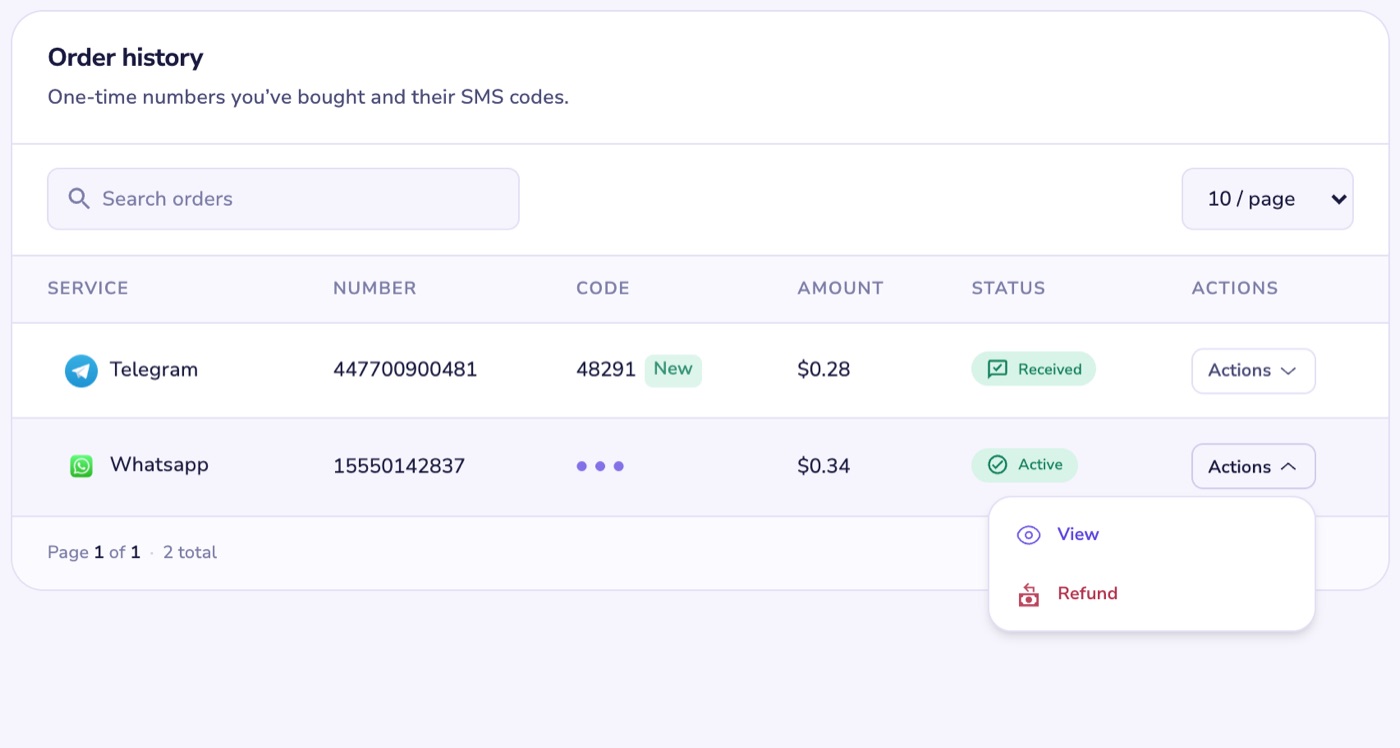
- You can also refund it yourself after 2 minutes. On the web, open the order's Actions and select Refund. In the app, tap Refund on the order.
- An order can't be refunded once a code has arrived, or once you've used Resend.
Rental numbers
- With Auto cancel on, a rental that gets no SMS within 18 minutes is cancelled and refunded automatically.
- Rental refunds go to your dollar wallet, at the dollar price, even if you paid in naira.
Gift cards
- If the card can't be issued when you buy it, the charge is reversed straight away.
- If the supplier is still working on it, we keep checking. If they refund it, we refund you automatically.
- A card that has been delivered can't be refunded.
Social media boosts
- A cancelled or rejected order is refunded in full.
- If only part was delivered, you get back the share that wasn't.
- An order still running after a week is treated as partly delivered and refunded for what's left.
Airtime, data and bills
- A purchase that fails is refunded straight away.
- A purchase that's still processing is checked again every few minutes for up to 72 hours. If it still hasn't gone through, message us.
eSIMs and proxies
- If the supplier turns the order down, you aren't charged.
- If the supplier hasn't confirmed it yet, the order stays pending while we follow it up. Message us if it stays that way.
- An eSIM can't be refunded once its QR code has been generated.
Asking for a refund
If your order isn't covered above, open Help, choose My order, pick the order, then I want a refund for this order. Tell us what went wrong and we'll review it.